
Hotel Tycoon 2 Controls
Every HUD input that actually moves a stay in the Lycke BETA.
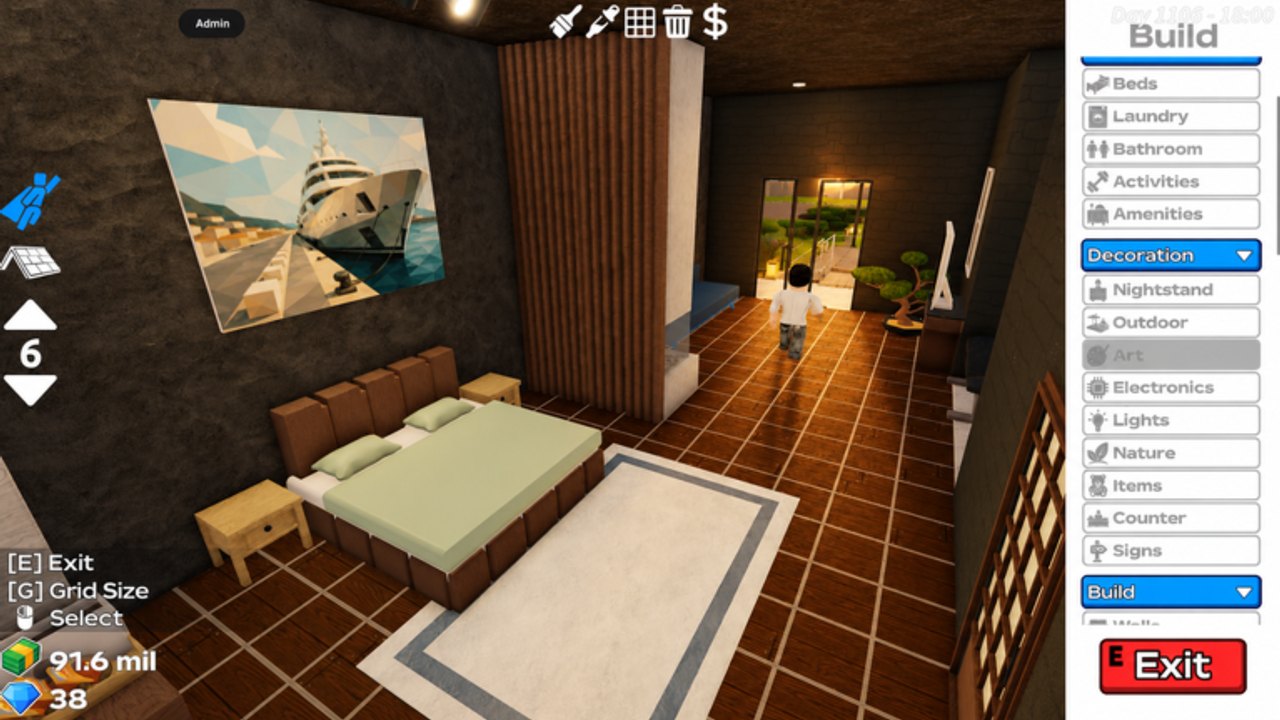
Hotel Tycoon 2 does not hide behind a 40-key bind list. Almost every action is a click or a one-letter toggle. This page is the control sheet so you stop fighting the catalog when a guest is waiting. Pair it with how to play for the loop and build mode for catalogs.
Guest service
| Input | What it does |
|---|---|
| Click / tap a guest | Start service — then walk them to a free bed |
| Click / tap a bed | Assign that mattress |
| Click a finished stay | Collect checkout cash |
| Click linens / basket | Pick up dirty bedding |
| Click the washer | Start a laundry cycle (HUD can show 0x when empty) |
If the catalog or the elevator keypad is open, those clicks hit the UI, not the guest. Close the overlay first. That is the number one “controls are broken” report on mobile.
Build mode
| Input | What it does |
|---|---|
| Build / hammer control | Open catalogs |
| [E] | Exit build mode |
| [G] | Cycle grid size (size 1 for outdoor clutter, size 6 for room plates) |
| Trash tool | Delete a piece |
| Paint tool | Recolor |
| Dollar / price tool | Place a priced item or sell |
| Red Exit / Back | Same as [E] on the Outdoor or Build sidebar |
Stay in build while a Bellhop escorts. If you have no Bellhop, tap [E] the moment a guest spawns. Full catalog names live on build mode.
Elevator keypad
Glass cabs open a numeric pad:
- G — ground
- 1–7 — upper floors (the promotional cab shows seven plus G)
- Bell and direction arrows — cab calls
- X — close the pad so you can click a guest again
The pad is not the code box. Do not paste gift strings here. Vertical layout: how to expand.
Mobile versus desktop
Desktop uses mouse clicks plus E and G. Mobile uses the same labels as on-screen buttons. Two mobile traps:
- The build sidebar covers the guest. Hit Exit, then tap.
- Pinch-zoom makes the washer look like a decoration. Zoom out until the
0xcounter is readable.
Six-player shards plus a glass tower stutter on low-end phones. If taps miss, it is lag, not a missing bind. Ask a friend to leave — multiplayer.
What is not a control
- Roblox escape / Settings is not the hotel staff panel.
- The language of this wiki is not an in-game bind.
- Auto collect is a gamepass, not a key. See gamepasses.
- Scripts inject extra keys. That is not official — script safety.
First-session drill
- Click one guest, assign a bed.
- Open build, press [G] once, place nothing, press [E].
- After checkout, pick up linens and start the washer — laundry.
- Only then decorate.
If a guest idles in the lobby after that drill, the path is blocked, not the bind. Delete the wall. Related: Getting Started, first-hour checklist, guides hub.
Frequently Asked Questions
Quick answers for Hotel Tycoon 2 on Roblox.
How do I exit build mode in Hotel Tycoon 2?
Press [E] on desktop or the red Exit / Back control on the catalog. Close the elevator keypad the same way before you click a guest.
What does [G] do?
It cycles grid size in build mode. Small grids for outdoor pieces, larger grids for room plates.
Why don’t taps register on mobile?
An overlay is usually open (catalog or keypad), or the shard is lagged. Close UI, then tap. Six-player towers stutter on phones.
Is there a key for auto collect?
No. Auto collect is a shop pass. Controls will not toggle it. See gamepasses.